DHCP
DHCP Client
Summary
Sub-menu: /ip/dhcp-client
DHCP (Dynamic Host Configuration Protocol) is used for the easy distribution of IP addresses in a network. The MikroTik RouterOS implementation includes both server and client parts and is compliant with RFC 2131.
The MikroTik RouterOS DHCP client may be enabled on any Ethernet-like interface at a time. The client will accept an address, netmask, default gateway, and two DNS server addresses. The received IP address will be added to the interface with the respective netmask. The default gateway will be added to the routing table as a dynamic entry. Should the DHCP client be disabled or not renew an address, the dynamic default route will be removed. If there is already a default route installed prior to the DHCP client obtaining one, the route obtained by the DHCP client will be shown as invalid.
RouterOS DHCP client asks for the following options:
- Option 1 - Subnet Mask.
- Option 3 - Gateway Addresses.
- Option 6 - DNS Server Addresses.
- Option 15 - Domain Name.
- Option 33 - Static Routes.
- Option 42 - NTP Server Addresses.
- Option 43 - Vendor Specific Information.
- Option 121 - Classless Static Routes.
- Option 138 - CAPWAP Access Controller Addresses.
DHCP Options
The DHCP client has the possibility to set up options that are sent to the DHCP server, for example, hostname and MAC address. The syntax is the same as for DHCP server options.
Currently, there are three variables that can be used in options:
- HOSTNAME.
- CLIENT_MAC - client interface MAC address.
- CLIENT_DUID - client DUID of the router, same as used for the DHCPv6 client. In conformance with RFC4361.
DHCP client default options include these default options:
| Name | code | value |
|---|---|---|
| clientid_duid | 61 | 0xff$(CLIENT_DUID) |
| clientid | 61 | 0x01$(CLIENT_MAC) |
| hostname | 12 | $(HOSTNAME) |
Properties
| Property | Description |
|---|---|
| add-default-route (yes | no | special-classless; Default: yes) | Whether to install a default route in the routing table received from DHCP server. By default, the RouterOS client complies with RFC and ignores option 3 if classless option 121 is received. To force the client not to ignore option 3 set special-classless. This parameter is available in v6rc12+
|
| allow-reconfigure (yes | no; Default: no) | Allows receiving Reconfigure (forcerenew) messages from the DHCP server. For changes in an existing dhcp-client, renew the lease. |
| check-gateway (none | arp | bfd | ping**;** Default: none) | Method on how to check route gateway reachability. |
| client-id (string; Default: ) | Corresponds to the settings suggested by the network administrator or ISP. If not specified, the client's MAC address will be sent |
| comment (string; Default: ) | Short description of the client |
| default-route-tables (table:distance; Default: default) | List of routing tables to which default route must be added. Table name can be preceded with ":x" where x would be the distance for the route to be installed with. |
| default-route-distance (integer:0..255; Default: ) | Default route distance. |
| disabled (yes | no; Default: yes) | Whether the client is disabled. |
| dscp (integer:0..63; Default: 0) | Sets the DSCP (Differentiated Services Code Point) value for outgoing DHCP client packets. This value is part of the IP header and is used to indicate the desired Quality of Service (QoS) level for network traffic. |
| host-name (string; Default: ) | The hostname of the client is sent to a DHCP server. If not specified, the client's system identity will be used. |
| interface (string; Default: ) | The interface on which the DHCP client will be running. |
| name (*string;*Default:) | name of the DHCP client, generated by RouterOS if not specified. |
| script (script; Default: ) | Execute script when DHCP client obtains a new lease or loses an existing one, received gateway address or DNS server list is changed. Variables that are accessible for the event script:
Example >> |
| use-broadcast (always | both | never; Default: both) | Whether to set the broadcast bit in DHCPDISCOVER and DHCPREQUEST messages. always - broadcastbit is set always both - broadcast bit is set only for the first 15 seconds always - broadcastbit is not set |
| use-peer-dns (yes | no; Default: yes) | Whether to accept the DNS settings advertised by DHCP Server. (Will override the settings put in the /ip/dns submenu. |
| use-peer-ntp (yes | no; Default: yes) | Whether to accept the NTP settings advertised by DHCP Server. (Will override the settings put in the /system/ntp/client submenu) |
| vlan-priority (integer:0..7; Default: 0) | If the DHCP client is running on a VLAN interface (/interface/vlan), you can specify the Priority Code Point (PCP) value. PCP is a 3-bit field in the VLAN header used to mark the priority of packets within a VLAN, allowing traffic to be prioritized accordingly. This setting applies only to VLAN interfaces and affects the priority of outgoing DHCP client packets. |
Read-only properties
| Property | Description |
|---|---|
| address (IP/Netmask) | IP address and netmask, which is assigned to DHCP Client from the Server |
| dhcp-server (IP) | The IP address of the DHCP server. |
| expires-after (time) | A time when the lease expires (specified by the DHCP server). |
| gateway (IP) | The IP address of the gateway which is assigned by the DHCP server |
| invalid (yes | no) | Shows whether a configuration is invalid. |
| netmask (IP) | |
| primary-dns (IP) | The IP address of the first DNS resolver, which was assigned by the DHCP server |
| primary-ntp (IP) | The IP address of the primary NTP server, assigned by the DHCP server |
| secondary-dns (IP) | The IP address of the second DNS resolver, assigned by the DHCP server |
| secondary-ntp (IP) | The IP address of the secondary NTP server, assigned by the DHCP server |
| status (bound | error | rebinding... | requesting... | searching... | stopped) | Shows the status of the DHCP Client |
| reconfigure-key(string) | Reconfiguration authentication key |
| reconfigure-last-counter (time) | Count of received Reconfigure (forcerenew) messages |
| custom-source-mac-address | |
| custom-hostname-suffix | |
| caps-managers |
Menu specific commands
| Property | Description |
|---|---|
| release (numbers) | Release current binding and restart the DHCP client |
| renew (numbers) | Renew current leases. If the renewal operation was not successful, the client tries to reinitialize the lease (i.e. it starts the lease request procedure (rebind) as if it had not received an IP address yet) |
Configuration Examples
Simple DHCP client
Add a DHCP client on the ether1 interface:
/ip/dhcp-client/add interface=ether1 disabled=no
After the interface is added, you can use the "print" or "print detail" command to see what parameters the DHCP client acquired:
[admin@MikroTik] /ip/dhcp-client> print detail
Flags: X - disabled, I - invalid
 0   interface=ether1 add-default-route=yes use-peer-dns=yes use-peer-ntp=yes
     status=bound address=192.168.0.65/24 gateway=192.168.0.1
     dhcp-server=192.168.0.1 primary-dns=192.168.0.1 primary-ntp=192.168.0.1
     expires-after=9m44s
[admin@MikroTik] /ip/dhcp-client>
If the interface used by the DHCP client is part of the VRF configuration, then the default route and other received routes from the DHCP server will be added to the VRF routing table.
DHCP client status can be checked with:
/ip/dhcp-client/print detail
Lease script example
It is possible to execute a script when a DHCP client obtains a new lease or loses an existing one. This is an example script that automatically adds a default route with routing-table=WAN1 and removes it when the lease expires or is removed.
Be aware that some variables might be reserved in specific menus and cannot be used there. More info can be found here.
/ip/dhcp-client
add add-default-route=no dhcp-options=hostname,clientid disabled=no interface=ether2 script="{\r\
\n :local rmark \"WAN1\"\r\
\n :local count [/ip/route/print count-only where comment=\"WAN1\"]\r\
\n :if (\$bound=1) do={\r\
\n :if (\$count = 0) do={\r\
\n /ip/route/add gateway=\$\"gateway-\" comment=\"WAN1\" routing-table=\$rmark\r\
\n } else={\r\
\n :if (\$count = 1) do={\r\
\n :local test [/ip/route/find where comment=\"WAN1\"]\r\
\n :if ([/ip/route/get \$test gateway] != \$\"gateway-\") do={\r\
\n /ip/route/set \$test gateway=\$\"gateway-\"\r\
\n }\r\
\n } else={\r\
\n :error \"Multiple routes found\"\r\
\n }\r\
\n }\r\
\n } else={\r\
\n /ip/route/remove [find comment=\"WAN1\"]\r\
\n }\r\
\n}\r\
\n"
Using received Option 43 to set the ACS URL
It is possible to set *Automatic Configuration Server (ACS)*URL in the TR069 client settings, when a DHCP client lease is bound, if the option sent from the DHCP server is configured to send it. Here's an example:
:if ($bound=1) do={
/tr069-client/set acs-url=$"vendor-specific"
}
Resolve default gateway when 'router' (option3) is from a different subnet
In some cases, administrators tend to set the 'router' option which cannot be resolved with the offered IP's subnet. For example, the DHCP server offers 192.168.88.100/24 to the client, and option 3 is set to 172.16.1.1. This will result in an unresolved default route:
 #      DST-ADDRESS        PREF-SRC        GATEWAY            DISTANCE
 0  DS  0.0.0.0/0                          172.16.1.1              1
 1 ADC  192.168.88.0/24    192.168.88.100  ether1
To fix this we need to add a /32 route to resolve the gateway over ether1, which can be done by the running script below each time the DHCP client gets an address
/system/script/add name="dhcpL" source={ /ip/address/add address=($"lease-address" . "/32") network=$"gateway-address" interface=$interface }
Now we can further extend the script, to check if the address already exists, and remove the old one if changes are needed
/system/script/add name="dhcpL" source={
/ip/address {
:local ipId [find where comment="dhcpL address"]
:if ($ipId != "") do={
:if (!([get $ipId ] = ($"lease-address" . "/32") && [get $ipId ]=$"gateway-address" )) do={
remove $ipId;
add address=($"lease-address" . "/32") network=$"gateway-address" \
interface=$interface comment="dhcpL address"
}
} else={
add address=($"lease-address" . "/32") network=$"gateway-address" \
interface=$interface comment="dhcpL address"
}
}
}
DHCPv6 Client
Summary
Sub-menu: /ipv6/dhcp-client
DHCP-client in RouterOS is capable of being a DHCPv6-client and DHCP-PD client. So it is able to get a prefix from the DHCP-PD server as well as the DHCPv6 stateful address from the DHCPv6 server.
Properties
| Property | Description |
|---|---|
| add-default-route (yes | no; Default: no) | Whether to add default IPv6 route after a client connects. |
| allow-reconfigure (yes | no; Default: no) | Allows receiving a Reconfigure (forcerenew) message from the DHCP server. |
| default-route-tables (table:distance; Default: main) | List of routing tables to which default route must be added. The table name can be prefixed with ":x" where x would be the distance for the route to be installed with. |
| comment (string; Default: ) | Short description of the client |
| disabled (yes | no; Default: no) | |
| interface (string; Default: ) | The interface on which the DHCPv6 client will be running. |
| pool-name (string; Default: ) | Name of the IPv6 pool in which the received IPv6 prefix will be added |
| pool-prefix-length (integer; Default: ) | Prefix length parameter that will be set for IPv6 pool in which the received IPv6 prefix is added. Prefix length must be greater than or equal to the length of the received prefix. If the value is unset, then the prefix will be added with the length as received from the server. |
| prefix-address-lists(string; Default: ) | Names of the firewall address lists to which the received prefix will be added. |
| prefix-hint (string; Default: ) | Include a preferred prefix length. |
| request (prefix, address; Default: ) | To choose if the DHCPv6 request will ask for the address or the IPv6 prefix, or both. |
| script (string; Default: ) | Run this script on the DHCP-client status change. Available variables:
|
| use-peer-dns (yes | no; Default: yes) | Whether to accept the DNS settings advertised by the IPv6 DHCP Server. |
| custom-duid (hex string; Default: ) | Allows specifying a custom DUID. |
| use-interface-duid(yes | no; Default: no) | According to the RFC, the DHCPv6 client generates a DUID based on the router's first interface MAC address, not the interface on which the client is configured. With this option enabled, you will override this requirement and the MAC address from the "interface" specified on the client will be used. |
| validate-server-duid (yes | no; Default: yes) | Allows ignoring an incorrectly formed DUID provided by the DHCPv6 server. Still checks that the minimal DUID length is correct. |
| custom-iapd-id(integer; Default: ) | Allows specifying a custom IAPD ID. |
| custom-iana-id(integer; Default: ) | Allows specifying a custom IANA ID. |
Read-only properties
| Property | Description |
|---|---|
| duid (string) | Auto-generated DUID that is sent to the server. DUID is generated using one of the MAC addresses available on the router. |
| request (list) | specifies what was requested - prefix, address, or both. |
| dynamic (yes | no) | |
| expires-after (time) | A time when the IPv6 prefix expires (specified by the DHCPv6 server). |
| invalid (yes | no) | Shows whether a configuration is invalid. |
| prefix (IPv6 prefix) | Shows the received IPv6 prefix from the DHCPv6-PD server |
| status (stopped | searching | requesting... | bound | renewing | rebinding | error | stopping) | Shows the status of DHCPv6 Client:
|
| reconfigure-key(string) | Reconfiguration authentication key |
| reconfigure-last-counter (integer) | Count of received forcerenew messages |
| dhcp-server-v6 | |
| address |
Menu specific commands
| Property | Description |
|---|---|
| release (numbers) | Release the current binding and restart the DHCPv6 client |
| renew (numbers) | Renew current leases. If the renewal operation was not successful, the client tries to reinitialize the lease (i.e. it starts the lease request procedure (rebind) as if it had not received an IP address yet) |
Script
It is possible to add a script that will be executed when a prefix or an address is acquired and applied or expires and is removed using the DHCP client. There are separate sets of variables that will have the value set by the client depending on prefix or address status change as the client can acquire both and each of them can have a different effect on the router configuration.
Available variables for dhcp-client
- pd-valid - value - 1 or 0 - if the prefix is acquired and it is applied or not
- pd-prefix - value ipv6/num (ipv6 prefix with mask) - the prefix itself
- na-valid - value - 1 or 0 - if the address is acquired and it is applied or not
- na-address - value - ipv6 address - the address
IAID
To determine what IAID will be used, convert the internal ID of an interface on which the DHCP client is running from hex to decimal.
For example, the DHCP client is running on interface PPPoE-out1. To get the internal ID use the following command:
[admin@t36] /interface> :put [find name="pppoe-out1"]
*15
Now convert hex value 15 to decimal and you get IAID=21
Configuration Examples
Simple DHCPv6 client
This simple example demonstrates how to enable a dhcp client to receive an IPv6 prefix and add it to the pool.
/ipv6/dhcp-client/add request=prefix pool-name=test- pool-prefix-length=64 interface=ether13
Detailed print should show the status of the client and we can verify if the prefix is received
[admin@x86-test] /ipv6/dhcp-client> print detail
Flags: D - dynamic, X - disabled, I - invalid
 0 interface=bypass pool-name="test-ipv6" pool-prefix-length=64 status=bound
prefix=2001:db8:7501:ff04::/62 expires-after=2d23h11m53s request=prefix
Notice that server gave us prefix 2a02:610:7501:ff04::/62 . And it should be also added to ipv6 pools
[admin@MikroTik] /ipv6/pool> print
Flags: D - dynamic
# NAME PREFIX REQUEST PREFIX-LENGTH
0 D test- 2001:db8:7501:ff04::/62 prefix 64
It works! Now you can use this pool, for example, for pppoe clients.
Use received prefix for local RA
Consider the following setup:
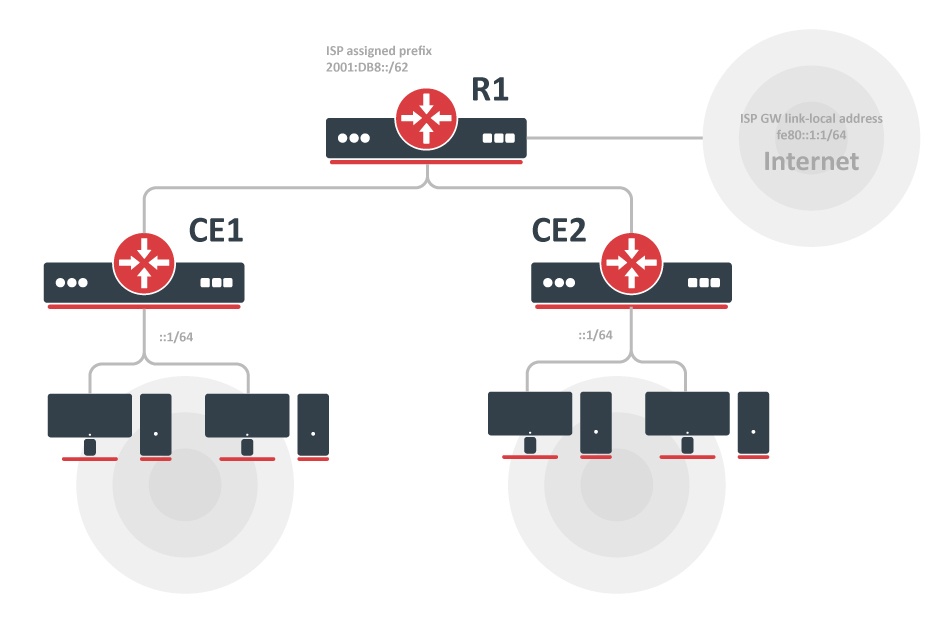
- ISP is routing prefix 2001:DB8::/62 to the router R1.
- Router R1 runs a DHCPv6 server to delegate /64 prefixes to the customer routers CE1 and CE2.
- DHCP client on routers CE1 and CE2 receives a delegated /64 prefix from the DHCP server (R1).
- Client routers use the received prefix to set up RA on the local interface.
Configuration
R1
/ipv6/route
add gateway=fe80::1:1%to-ISP

/ipv6/pool
add name=myPool prefix=2001:db8::/62 prefix-length=64

/ipv6/dhcp-server
 add prefix-pool=myPool disabled=no interface=to-CE-routers lease-time=3m name=server1
CE1
/ipv6/dhcp-client
add interface=to-R1 request=prefix pool-name=my-
/ipv6/address
add address=::1/64 from-pool=my- interface=to-clients advertise=yes
CE2
/ipv6/dhcp-client
add interface=to-R1 request=prefix pool-name=my-
/ipv6/address/add address=::1/64 from-pool=my- interface=to-clients advertise=yes
Check the status
After configuration is complete, we can verify that each CE router received its own prefix
On the server:
[admin@R1] /ipv6/dhcp-server/binding> print
 Flags: X - disabled, D - dynamic
# ADDRESS DUID IAID SERVER STATUS
 1 D 2001:db8:1::/64 0019d1393536 566 server1 bound
2 D 2001:db8:2::/64 0019d1393535 565 server1 bound
On client:
[admin@CE1] /ipv6/dhcp-client> print
Flags: D - dynamic, X - disabled, I - invalid
# INTERFACE STATUS REQUEST PREFIX
0 to-R1 bound prefix 2001:db8:1::/64
[admin@CE1] /ipv6/dhcp-client> /ipv6/pool/print
Flags: D - dynamic
# NAME PREFIX PREFIX-LENGTH
0 D my- 2001:db8:1::/64 64
We can also see that an IPv6 address was automatically added from the prefix pool:
[admin@CE1] /ipv6/address> print
Flags: X - disabled, I - invalid, D - dynamic, G - global, L - link-local
# ADDRESS FROM-POOL INTERFACE ADVERTISE 0 G 2001:db8:1::1/64 to-clients yes
..
And pool usage shows that 'Address' is allocating the pool
[admin@CE1] /ipv6/pool/used> print
POOL PREFIX OWNER INFO
my- 2001:db8:1::/64 Address to-clients
DHCP Server
Summary
The DHCP (Dynamic Host Configuration Protocol) is used for the easy distribution of IP addresses in a network. The MikroTik RouterOS implementation includes both server and client parts and is compliant with RFC 2131.
The router supports an individual server for each Ethernet-like interface. The MikroTik RouterOS DHCP server supports the basic functions of giving each requesting client an IP address/netmask lease, default gateway, domain name, DNS-server(s) and WINS-server(s) (for Windows clients) information (set up in the DHCP networks submenu).
In order for the DHCP server to work, IP pools must also be configured (do not include the DHCP server's own IP address into the pool range) and the DHCP networks must also be configured.
It is also possible to hand out leases for DHCP clients using the RADIUS server; the supported parameters for a RADIUS server are as follows:
Access-Request:
- NAS-Identifier - router identity.
- NAS-IP-Address - IP address of the router itself.
- NAS-Port - the ID of the interface where the DHCP server is configured. This value is the same as the IF-MIB::ifIndex.
- NAS-Port-Id - the name of the interface where the DHCP server is configured.
- NAS-Port-Type - Ethernet.
- Calling-Station-Id - client identifier (active-client-id).
- Framed-IP-Address - IP address of the client (active-address).
- Called-Station-Id - the name of the DHCP server.
- User-Name - MAC address of the client (active-mac-address).
- Password - " ".
Access-Accept:
- Framed-IP-Address - IP address that will be assigned to a client.
- Framed-Pool - IP pool from which to assign an IP address to a client.
- Rate-Limit - Data rate limitation for DHCP clients. Format is: rx-rate[/tx-rate] [rx-burst-rate[/tx-burst-rate] [rx-burst-threshold[/tx-burst-threshold] [rx-burst-time[/tx-burst-time][priority] [rx-rate-min[/tx-rate-min]]]]. All rates should be numbers with optional 'k' (1,000s) or 'M' (1,000,000s). If tx-rate is not specified, rx-rate is used as tx-rate too. Same goes for tx-burst-rate and tx-burst-threshold and tx-burst-time. If both rx-burst-threshold and tx-burst-threshold are not specified (but burst-rate is specified), rx-rate and tx-rate are used as burst thresholds. If both rx-burst-time and tx-burst-time are not specified, 1s is used as the default. Priority takes values 1..8, where 1 implies the highest priority, but 8 - the lowest. If rx-rate-min and tx-rate-min are not specified, rx-rate and tx-rate values are used. The rx-rate-min and tx-rate-min values cannot exceed rx-rate and tx-rate values.
- Ascend-Data-Rate - TX/RX data rate limitation if multiple attributes are provided, the first limits the tx data rate, the second - the RX data rate. If used together with Ascend-Xmit-Rate, specifies the RX rate. 0 if unlimited.
- Ascend-Xmit-Rate - tx data rate limitation. It may be used to specify the TX limit only instead of sending two sequential Ascend-Data-Rate attributes (in that case Ascend-Data-Rate will specify the receive rate). 0 if unlimited.
- Session-Timeout - max lease time (lease-time).
DHCP server requires a real interface to receive raw ethernet packets. If the interface is a Bridge interface, then the Bridge must have a real interface attached as a port to that bridge which will receive the raw ethernet packets. It cannot function correctly on a dummy (empty bridge) interface.
DHCP Server Properties
| Property | Description |
|---|---|
| add-arp (yes | no; Default: no) | Whether to add a dynamic ARP entry. If set to no either ARP mode should be enabled on that interface or static ARP entries should be administratively defined in /ip/arp submenu. |
| add-dns-entries (yes | no) | Specify whether to create dynamic DNS entry for this particular lease and use host name as domain name |
| add-dns-entries-suffix (string) | Suffix added to dynamic DNS entries created for each lease. |
| address-pool (string | static-only; Default: static-only) | IP pool, from which to take IP addresses for the clients. If set to static-only, then only the clients that have a static lease (added in the lease submenu) will be allowed. |
| allow-dual-stack-queue (yes | no; Default: yes) | Creates a single simple queue entry for both IPv4 and IPv6 addresses, and uses the MAC address and DUID for identification. Requires IPv6 DHCP Server to have this option enabled as well to work properly. |
| always-broadcast (yes | no; Default: no) | Changes whether to force broadcast DHCP replies:
|
| authoritative (after-10sec-delay | after-2sec-delay | yes | no; Default: yes) | Option changes the way a server responds to DHCP requests:
If all requests with "secs < x" should be ignored, then delay-threshold=x setting should be used. |
| bootp-lease-time (forever | lease-time | time; Default: forever) | Accepts two predefined options or time value:
|
| bootp-support (none | static | dynamic; Default: static) | Support for BOOTP clients:
|
| client-mac-limit (integer | unlimited; Default: unlimited) | Specifies whether to limit a specific number of clients per single MAC address or leave unlimited. Note that this setting should not be used in relay setups. |
| conflict-detection (yes | no; Default: yes) | Allows disabling/enabling conflict detection. If the option is enabled, then whenever the server tries to assign a lease it will send ICMP and ARP messages to detect whether such an address in the network already exists. If any of the above get a reply address is considered already used. |
| delay-threshold (time | none; Default: none) | If the secs field in the DHCP packet is smaller than the delay threshold, then this packet is ignored. If set to none - there is no threshold (all DHCP packets are processed) |
| dhcp-option-set (name | none; Default: none) | Use a custom set of DHCP options defined in the option sets menu. |
| dynamic-lease-identifiers (list of client-id, client-mac. opt-82; Default: client-id,client-mac) | Specifies which parameters to use and store when generating a dynamic DHCP lease. |
| insert-queue-before (bottom | first | name; Default: first) | Specifies where to place dynamic simple queue entries for static DHCP leases with a rate-limit parameter set. |
| interface (string; Default: ) | The interface on which the DHCP server will be running. |
| lease-script (string; Default: "") | A script that will be executed after a lease is assigned or de-assigned. Internal "global" variables that can be used in the script:
|
| lease-time (time; Default: 3****0m) | The time that a client may use the assigned address. The client will try to renew this address after half of this time and will request a new address after the time limit expires. |
| name (string; Default: ) | Reference name |
| parent-queue (string | none; Default: none) | A dynamically created queue for this lease will be configured as a child queue of the specified parent queue. |
| relay (IP; Default: 0.0.0.0) | The IP address of the relay this DHCP server should process requests from:
|
| server-address (IP; Default: 0.0.0.0) | The IP address of the server to use in the next step of the client's bootstrap process (for example, to assign a specific server address in case several addresses are assigned to the interface) |
| support-broadband-tr101 (yes | no; Default: no) | Enables or disables the inclusion of additional Option 82 suboptions (e.g. 0x81 actual upstream, 0x82 actual downstream) in RADIUS Access-Request and Accounting-Request messages as described in RFC 4679 and Broadband Forum TR-101. When enabled, the DHCP server includes specific suboptions under DHCP Option 82 (Relay Agent Information) that are used by RADIUS servers to identify subscriber line parameters in broadband access networks, especially those based on DSL infrastructure. This property only has an effect when use-radius is set to yes or accounting. |
| use-framed-as-classless (yes | no; Default: yes) | Forward RADIUS Framed-Route as a DHCP Classless-Static-Route to DHCP-client. Whenever both Framed-Route and Classless-Static-Route are received, Classless-Static-Route is preferred. |
| use-radius (yes | no | accounting; Default: no) | Whether to use RADIUS server:
|
| use-reconfigure(yes | no; Default: no) | Allows the server to send Reconfigure (forcerenew) messages to clients, prompting them to renew their configuration without waiting for their lease to expire. |
| add-dns-entries | |
| add-dns-entries-suffix | |
| address-lists |
Leases
Sub-menu: /ip/dhcp-server/lease
The DHCP server lease submenu is used to monitor and manage server leases. The issued leases are shown here as dynamic entries. You can also add static leases to issue a specific IP address to a particular client (identified by MAC address).
Generally, the DHCP lease is allocated as follows:
- An unused lease is in the "waiting" state.
- If a client asks for an IP address, the server chooses one.
- If the client receives a statically assigned address, the lease becomes offered, and then bound with the respective lease time.
- If the client receives a dynamic address (taken from an IP address pool), the router sends a ping packet and waits for an answer for 0.5 seconds. During this time, the lease is marked testing.
- In the case where the address does not respond, the lease becomes offered and then bound with the respective lease time.
- In other cases, the lease becomes busy for the lease time (there is a command to retest all busy addresses), and the client's request remains unanswered (the client will try again shortly).
A client may free the leased address. The dynamic lease is removed, and the allocated address is returned to the address pool. But the static lease becomes busy until the client reacquires the address.
IP addresses assigned statically are not probed!
| Property | Description |
|---|---|
| address (IP; Default: 0.0.0.0) | Specify IP address (or ip pool) for static lease. If set to 0.0.0.0 - a pool from the DHCP server will be used |
| address-lists (string; Default: none) | Address list to which address will be added if the lease is bound. |
| agent-circuit-id (hex string;Default none) | If specified, value must match the Option 82 Agent Circuit ID suboption of the request. |
| agent-remote-id (hex string;Default none) | If specified, value must match the Option 82 Agent Remote ID suboption of the request. |
| allow-dual-stack-queue (yes | no; Default: yes) | Creates a single simple queue entry for both IPv4 and IPv6 addresses, and uses the MAC address and DUID for identification. Requires IPv6 DHCP Server to have this option enabled as well to work properly. |
| always-broadcast (yes | no; Default: no) | Changes whether to force broadcast DHCP replies:
|
| block-access (yes | no; Default: no) | Block access for this client |
| client-id (string; Default: none) | If specified, must match the DHCP 'client identifier' option of the request |
| dhcp-option (string; Default: none) | Add additional DHCP options from option list. |
| dhcp-option-set (string; Default: none) | Add an additional set of DHCP options. |
| insert-queue-before (bottom | first | name; Default: first) | Specify where to place dynamic simple queue entries for static DHCP leases with rate-limit parameter set. |
| lease-time (time; Default: 0s) | Time that the client may use the address. If set to 0s lease will never expire. |
| mac-address (MAC; Default: 00:00:00:00:00:00) | If specified, must match the MAC address of the client |
| parent-queue (string | none; Default: none) | A dynamically created queue for this lease will be configured as a child queue of the specified parent queue. |
| queue-type (default, ethernet-default, multi-queue-ethernet-default, pcq-download-default, synchronous-default, default-small, hotspot-default, only-hardware-queue, pcq-upload-default, wireless-default) | Queue type that can be assigned to the specific lease |
| rate-limit (integer[/integer] [integer[/integer] [integer[/integer] [integer[/integer]]]];; Default: ) | Adds a dynamic simple queue to limit IP's bandwidth to a specified rate. Requires the lease to be static. Format is: rx-rate[/tx-rate] [rx-burst-rate[/tx-burst-rate] [rx-burst-threshold[/tx-burst-threshold] [rx-burst-time[/tx-burst-time]]]]. All rates should be numbers with optional 'k' (1,000s) or 'M' (1,000,000s). If tx-rate is not specified, rx-rate is used as tx-rate too. Same goes for tx-burst-rate and tx-burst-threshold and tx-burst-time. If both rx-burst-threshold and tx-burst-threshold are not specified (but burst-rate is specified), rx-rate and tx-rate are used as burst thresholds. If both rx-burst-time and tx-burst-time are not specified, 1s is used as default. |
| routes ([dst-address/mask] [gateway] [distance]; Default: none) | Routes that appear on the server when the client is connected. It is possible to specify multiple routes separated by commas. This setting will be ignored for OpenVPN. |
| server (string) | Server name which serves this client |
| use-src-mac(yes | no; Default: no) | When this option is set, the server uses the source MAC address instead of the received CHADDR to assign the address. |
| status (waiting | testing | declined | offered | bound | authorizing | conflict) | Shows the status of the DHCP lease:
|
Menu specific commands
| check-status (id) | Check the status of a given busy (status is conflict or declined) dynamic lease, and free it in case of no response |
| make-static (id) | Convert a dynamic lease to a static one |
| send-reconfigure (id) | Send Reconfigure (forcerenew) message |
Store Configuration
Sub-menu: /ip/dhcp-server/config
Store Leases On Disk: The configuration of how often the DHCP leases will be stored on disk. If they were saved on a disk on every lease change, a lot of disk writes would happen which is very bad for Compact Flash (especially if lease times are very short). To minimize writes on disk, all changes are saved on disk every store-leases-disk seconds. Additionally, leases are always stored on disk on graceful shutdown and reboot.
Manual changes to leases - addition/removal of a static lease, removal of a dynamic lease - will cause changes to be pushed for this lease to storage.
Accounting: The accounting parameter in the DHCP server configuration enables or disables accounting for DHCP leases. When accounting is enabled, the DHCP server logs information about IP address assignments and lease renewals. This information can be useful for tracking and monitoring network usage, analyzing traffic patterns, or generating reports on IP address allocations.
Interim-update: The interim-update parameter determines whether the DHCP server sends periodic updates to the accounting server during a lease. These updates provide information about the lease duration, usage, and other relevant details. Enabling interim updates allows for more accurate tracking of lease activity.
Radius-password: The radius-password parameter is used to set the password for the RADIUS (Remote Authentication Dial-In User Service) server. RADIUS is a networking protocol commonly used for providing centralized authentication, authorization, and accounting for network access. When configuring the DHCP server to communicate with a RADIUS server for authentication or accounting purposes, you need to specify the correct password to establish a secure connection. This parameter ensures that the DHCP server can authenticate with the RADIUS server using the specified password.
Rate limiting
It is possible to set the bandwidth to a specific IPv4 address by using DHCPv4 leases. This can be done by setting a rate limit on the DHCPv4 lease itself, by doing this, a dynamic simple queue rule will be added for the IPv4 address that corresponds to the DHCPv4 lease. By using the rate-limit parameter, you can conveniently limit a user's bandwidth.
For any queues to work properly, the traffic must not be FastTracked, make sure your Firewall does not FastTrack traffic that you want to limit.
First, make the DHCPv4 lease static, otherwise, it will not be possible to set a rate limit for a DHCPv4 lease:
[admin@MikroTik] > /ip/dhcp-server/lease/print
Flags: X - disabled, R - radius, D - dynamic, B - blocked
 #   ADDRESS               MAC-ADDRESS       HOST-NAME               SERVER               RATE-LIMIT               STATUS
 0 D 192.168.88.254        6C:3B:6B:7C:41:3E MikroTik                DHCPv4_Server                                 bound

[admin@MikroTik] > /ip/dhcp-server/lease/make-static 0

[admin@MikroTik] > /ip/dhcp-server/lease/print
Flags: X - disabled, R - radius, D - dynamic, B - blocked
 #   ADDRESS               MAC-ADDRESS       HOST-NAME               SERVER               RATE-LIMIT               STATUS
 0   192.168.88.254        6C:3B:6B:7C:41:3E MikroTik                DHCPv4_Server                                 bound
Then you can set a rate to a DHCPv4 lease that will create a new dynamic simple queue entry:
[admin@MikroTik] > /ip/dhcp-server/lease/set 0 rate-limit=10M/10M

[admin@MikroTik] > /queue/simple/print
Flags: X - disabled, I - invalid, D - dynamic
 0  D name="dhcp-ds<6C:3B:6B:7C:41:3E>" target=192.168.88.254/32 parent=none packet-marks="" priority=8/8 queue=default-small/default-small limit-at=10M/10M max-limit=10M/10M burst-limit=0/0 burst-threshold=0/0 burst-time=0s/0s
      bucket-size=0.1/0.1
By default allow-dual-stack-queue is enabled; this will add a single dynamic simple queue entry for both DHCPv6 binding and DHCPv4 lease, without this option enabled, separate dynamic simple queue entries will be added for IPv6 and IPv4.
If allow-dual-stack-queue is enabled, then a single dynamic simple queue entry will be created containing both IPv4 and IPv6 addresses:
[admin@MikroTik] > /queue/simple/print
Flags: X - disabled, I - invalid, D - dynamic
 0  D name="dhcp-ds<6C:3B:6B:7C:41:3E>" target=192.168.88.254/32,fdb4:4de7:a3f8:418c::/66 parent=none packet-marks="" priority=8/8 queue=default-small/default-small limit-at=10M/10M max-limit=10M/10M burst-limit=0/0 burst-threshold=0/0
      burst-time=0s/0s bucket-size=0.1/0.1
Network
Sub-menu: /ip/dhcp-server/network
Properties
| Property | Description |
|---|---|
| address (IP/netmask; Default: ) | The network DHCP server(s) will lease addresses from |
| boot-file-name (string; Default: ) | Boot filename |
| caps-manager (string; Default: ) | A comma-separated list of IP addresses for one or more CAPsMAN system managers. DHCP Option 138 (capwap) will be used. |
| dhcp-option (string; Default: ) | Add additional DHCP options from the option list. |
| dhcp-option-set (string; Default: ) | Add an additional set of DHCP options. |
| dns-none (yes | no; Default: no) | If set, then DHCP Server will not pass DNS servers configured on the router to the DHCP clients. |
| dns-server (string; Default: ) | DNS servers that will be passed to DHCP clients. Two comma-separated DNS servers can be specified to be used by the DHCP client as primary and secondary DNS servers By default, if there are no DNS servers configured, then the router dynamic DNS Servers from IP>DNS will be passed to DHCP clients, if there are no dynamic DNS servers configured, the router static DNS servers from IP>DNS will be passed to DHCP clients. |
| domain (string; Default: ) | The DHCP client will use this as the 'DNS domain' setting for the network adapter. |
| gateway (IP; Default: 0.0.0.0) | The default gateway to be used by DHCP Client. |
| netmask (integer: 0..32; Default: 0) | The actual network mask is to be used by the DHCP client. If set to '0' - netmask from network address will be used. |
| next-server (IP; Default: ) | The IP address of the next server to use in bootstrap. |
| ntp-none (yes | no; Default: no) | If set, then DHCP Server will not pass NTP servers configured on the router to the DHCP clients. |
| ntp-server (IP; Default: ) | The DHCP client will use these as the default NTP servers. Two comma-separated NTP servers can be specified to be used by the DHCP client as primary and secondary NTP servers |
| wins-server (IP; Default: ) | The Windows DHCP client will use these as the default WINS servers. Two comma-separated WINS servers can be specified to be used by the DHCP client as primary and secondary WINS servers |
RADIUS Support
Since RouterOS v6.43, it is possible to use RADIUS to assign a rate limit per lease. To do so, you need to pass the Mikrotik-Rate-Limit attribute from your RADIUS Server for your lease. To achieve this you first need to set your DHCPv4 Server to use RADIUS for assigning leases. Below is an example of how to set it up:
/radius
add address=10.0.0.1 secret=VERYsecret123 service=dhcp
/ip/dhcp-server
set dhcp1 use-radius=yes
After that, you need to tell your RADIUS Server to pass the Mikrotik-Rate-Limit attribute. In case you are using FreeRADIUS with MySQL, then you need to add appropriate entries into radcheck and radreply tables for a MAC address that is being used for your DHCPv4 Client. Below is an example for table entries:
INSERT INTO `radcheck` (`username`, `attribute`, `op`, `value`) VALUES
('00:0C:42:00:D4:64', 'Auth-Type', ':=', 'Accept'),

INSERT INTO `radreply` (`username`, `attribute`, `op`, `value`) VALUES
('00:0C:42:00:D4:64', 'Framed-IP-Address', '=', '192.168.88.254'),
('00:0C:42:00:D4:64', 'Mikrotik-Rate-Limit', '=', '10M'),
Alerts
To find any rogue DHCP servers as soon as they appear in your network, the DHCP Alert tool can be used. It will monitor the interface for all DHCP replies and check if this reply comes from a valid DHCP server. If a reply from an unknown DHCP server is detected, an alert gets triggered:
[admin@MikroTik] /ip/dhcp-server/alert> /log/print
00:34:23 dhcp,critical,error,warning,info,debug dhcp alert on Public:
discovered unknown dhcp server, mac 00:02:29:60:36:E7, 10.5.8.236
[admin@MikroTik] /ip/dhcp-server/alert>
When the system alerts about a rogue DHCP server, it can execute a custom script.
As DHCP replies can be unicast, the rogue DHCP detector may not receive any offer to other DHCP clients at all. To deal with this, the rogue DHCP detector acts as a DHCP client as well - it sends out DHCP discover requests once a minute.
The DHCP alert is not recommended on devices that are configured as DHCP clients. Since the alert itself generates DHCP discovery packets, it can affect the operation of the DHCP client itself. Use this feature only on devices that are DHCP servers or use a static IP address.
Sub-menu: /ip/dhcp-server/alert
Properties
| Property | Description |
|---|---|
| alert-timeout(none | time; Default: 1h) | Time after which the alert will be forgotten. If after that time the same server is detected, a new alert will be generated. If set to none, timeout will never expire. |
| interface (string; Default: ) | Interface, on which to run rogue DHCP server finder. |
| on-alert (string; Default: ) | Script to run when an unknown DHCP server is detected. |
| valid-server(string; Default: ) | List of MAC addresses of valid DHCP servers. |
Read-only properties
| Property | Description |
|---|---|
| unknown-server(string) | List of MAC addresses of detected unknown DHCP servers. The server is removed from this list after alert-timeout. |
Menu specific commands
| Property | Description |
|---|---|
| reset-alert(id) | Clear all alerts on an interface |
DHCP Options
Sub-menu: /ip/dhcp-server/option
With the help of the DHCP Option list, it is possible to define additional custom options for DHCP Server to advertise. Option precedence is as follows:
- radius.
- lease.
- server.
- network.
This is the order in which the client option request will be filled.
According to the DHCP protocol, a parameter is returned to the DHCP client only if it requests this parameter, specifying the respective code in the DHCP request Parameter-List (code 55) attribute. If the code is not included in the Parameter-List attribute, the DHCP server will not send it to the DHCP client, but since RouterOS v7.1rc5 it is possible to force the DHCP option from the server-side even if the DHCP-client does not request such a parameter:
/ip/dhcp-server/option/set force=yes
Properties
| Property | Description |
|---|---|
| code (integer:1..254; Default: ) | dhcp option code. All codes are available at 'link'. |
| name (string; Default: ) | Descriptive name of the option |
| value (string; Default: ) | Parameter's value. Available data types for options are:
For example, if HOSTNAME is 'kvm', then the raw value will be 0x0176617264736b766d. |
| raw-value (HEX string ) | Read-only field which shows the raw DHCP option value (the format actually sent out) |
| force |
DHCP Option Sets
Sub-menu: /ip/dhcp-server/option/sets
This menu allows combining multiple options in option sets, which later can be used to override the default DHCP server option set.
Example
Classless Route
A classless route adds a specified route in the client's routing table. In our example, it will add:
- dst-address=160.0.0.0/24 gateway=10.1.101.1
- dst-address=0.0.0.0/0 gateway=10.1.101.1
According to RFC 3442: The first part is the netmask ("18" = netmask /24). The second part is the significant part of destination network ("A00000" = 160.0.0). The third part is the IP address of gateway ("0A016501" = 10.1.101.1). Then there are parts of the default route, destination netmask (0x00 = 0.0.0.0/0) followed by default route (0x0A016501 = 10.1.101.1)
/ip/dhcp-server/option
add code=121 name=classless value=0x18A000000A016501000A016501
/ip/dhcp-server/network
set 0 dhcp-option=classless
Result:
[admin@MikroTik] /ip/route> print
Flags: X - disabled, A - active, D - dynamic, C - connect, S - static, r - rip, b - bgp, o - ospf,
m - mme, B - blackhole, U - unreachable, P - prohibit
 #      DST-ADDRESS        PREF-SRC        GATEWAY            DISTANCE
 0 ADS  0.0.0.0/0                          10.1.101.1         0
 1 ADS  160.0.0.0/24                       10.1.101.1         0
A much more robust way would be to use built-in variables. The previous example can be rewritten as:
/ip/dhcp-server/option
add name=classless code=121 value="0x18A00000\$(NETWORK_GATEWAY)0x00\$(NETWORK_GATEWAY)"
Auto proxy config
/ip/dhcp-server/option
  add code=252 name=auto-proxy-config value="'https://autoconfig.something.lv/wpad.dat'"
Option matcher
The Option matcher allows identifying DHCP clients by any of the DHCP options and assigning an IP address from a specific IP pool.
It is possible to perform exact (provided value should match exactly ) or substring matching (will look for value match anywhere in the option string — it can match values at the start, middle, or end).
Substring matching is useful in cases where the value can change depending on the end device, for example, if the class-identifier sent by the device contains not only vendor information, but also the exact MAC or other additional information.
It's possible to define two substring matches for the same option, for example, one that matches "ABC" and another one that matches "ABCDE". If there is a DHCP option with the value of "ABCDEF", both entries would match it, but the matcher that will get applied will be selected randomly.
Clients with a static lease will continue to receive their static address, even when matched by the option matcher.
Properties
| Property | Description |
|---|---|
| address-pool (string | static-only; Default: static-only) | IP pool, from which to take IP addresses for the clients. If set to static-only, then only clients that have a static lease (added in the lease submenu) will be allowed. |
| code (integer:1..254; Default: ) | DHCP option code. All codes are available at 'link'. |
| comment (string; Default: ) | Short description of the option matcher. |
| disabled (yes | no; Default: no) | Whether an item is disabled |
| matching-type (exact | substring; Default: ) | Matching method:
|
| name (string; Default: ) | Descriptive name for the option matcher. |
| option-set (name | none; Default: none) | A custom set of DHCP options defined in the Option Sets menu. |
| server (string | all; Default: ) | Server name which serves the option matcher. |
| value (string; Default: ) | A value that will be searched for in the option. Available data types for value are:
|
Option matcher examples
Match dhcp1 server clients by exact Vendor class identifier (DHCP option 60) and assign an address from the pool1:
/ip/dhcp-server/matcher
add address-pool=pool1 code=60 matching-type=exact name=test1 server=dhcp1 value=android-dhcp-11
Match clients on all DHCP servers by exact Client Id (DHCP option 61) configured as hex value and assign address from the pool2:
/ip/dhcp-server/matcher
add address-pool=pool2 code=61 matching-type=exact name=test2 server=all value=0x016c3b6bed8364
Match dhcp2 server clients partially by Hostname (DHCP option 12) and assign an address from the pool3:
/ip/dhcp-server/matcher
add address-pool=pool3 code=12 matching-type=substring name=test3 server=dhcp2 value=MikroTik
Configuration Examples
Setup
To simply configure a DHCP server you can use a setup command.
First, you configure an IP address on the interface:
[admin@MikroTik] > /ip/address/add address=192.168.88.1/24 interface=ether3 disabled=no
Then you use setup, a command which will automatically ask for necessary parameters:
[admin@MikroTik] > /ip/dhcp-server/setup
Select to run DHCP server on
dhcp server : ether3
Select for DHCP addresses
dhcp space: 192.168.88.0/24
Select gateway for given
gateway for dhcp : 192.168.88.1
Select pool of addresses given out by DHCP server
addresses to give out: 192.168.88.2-192.168.88.254
Select DNS servers
servers: 10.155.126.1,10.155.0.1,
Select lease time
lease time: 10m
That is all. You have configured an active DHCP server.
Manual configuration
To configure the DHCP server manually to respond to local requests you have to configure the following:
- An IP pool for addresses to be given out. Make sure that your gateway/DHCP server address is not part of the pool.
/ip/pool/add name=dhcp_pool0 ranges=192.168.88.2-192.168.88.254
- A network indicating subnets that DHCP-server will lease addresses from, among other information, like a gateway, DNS-server, NTP-server, DHCP options, etc.
/ip/dhcp-server/network/add address=192.168.88.0/24 dns-server=192.168.88.1 gateway=192.168.88.1
- In our case, the device itself is serving as the gateway, so we'll add the address to the bridge interface:
/ip/address/add address=192.168.88.1/24 interface=bridge1 network=192.168.88.0
- And finally, add DHCP Server, here we will add the previously created address pool, and specify on which interface the DHCP server should work.
/ip/dhcp-server/add address-pool=dhcp_pool0 disabled=no interface=bridge1 name=dhcp1
DHCPv6 Server
Summary
Standards: RFC 3315, RFC 3633
A single DUID is used for client and server identification; only IAID will vary between clients corresponding to their assigned interface.
Client binding creates a dynamic pool with a timeout set to binding's expiration time (note that now dynamic pools can have a timeout), which will be updated every time the binding gets renewed.
When a client is bound to a prefix, the DHCP server adds routing information to know how to reach the assigned prefix.
General
Sub-menu: /ipv6/dhcp-server
This sub-menu lists and allows configuring DHCP-PD servers.
DHCPv6 Server Properties
| Property | Description |
|---|---|
| address-pool (enum | static-only; Default: static-only) | IPv6 pool, from which to take an IPv6 address for the clients, pool prefix-length must be specified as /128. |
| prefix-pool (enum | static-only; Default: static-only) | IPv6 pool, from which to take IPv6 prefixes for the clients. |
| allow-dual-stack-queue(yes | no; Default:yes) | Creates a single simple queue entry for both IPv4 and IPv6 addresses, and uses the MAC address and DUID for identification. Requires IPv6 DHCP Server to have this option enabled as well to work properly. |
| address-lists (string; Default:) | Comma-separated list of address-lists. Address or prefix issued by the server will be added to these lists. |
| binding-script (string; Default: ) | A script that will be executed after binding is assigned or de-assigned. Internal "global" variables that can be used in the script:
|
| dhcp-option (string; Default: none) | Adds additional DHCP options from option list. |
| insert-queue-before (bottom | first | name; Default: first) | Specifies where to place dynamic simple queue entries for static DHCP leases with a rate-limit parameter set. |
| parent-queue (string | none; Default: none) | A dynamically created queue for this lease will be configured as a child queue of the specified parent queue. |
| preference (integer [0..255]; Default: 255) | Defines the server priority level in client selection when multiple servers respond. |
| disabled (yes | no; Default: no) | Whether the DHCP-PD server participates in the prefix assignment process. |
| interface (string; Default: ) | The interface on which the server will be running. |
| lease-time (time; Default: 3d) | The time that a client may use the assigned address. The client will try to renew this address after half of this time and will request a new address after the time limit expires. |
| **rapid-commit (**yes | no; Default: yes) | Enables a two-message exchange (Solicit and Reply) for quicker client configuration by skipping the standard four-message process. |
| route-distance(integer [0..255]; Default:1) | Specifies the distance to set for dynamically installed routes towards DHCPv6 clients. |
| use-radius (yes | no | accounting; Default: no) | Whether to use a RADIUS server:
|
| use-reconfigure(yes | no; Default: no) | Allows the server to send Reconfigure messages to clients, prompting them to renew or update their configuration without waiting for their lease to expire. |
| name (string; Default: ) | Reference name |
| address-lists (string; Default: none) | Address list to which the address will be added if the lease is bound. |
| ignore-ia-na-bindings (yes | no; Default: no) | Does not reply to DHCPv6 address requests and processes only prefixes. Without this setting, even if the server does not have address-pool configured, it has to respond to the client that there is no address available for the client. That can lead to the situation when DHCPv6 client requests address and prefix in a loop. |
Read-only Properties
| Property | Description |
|---|---|
| dynamic (yes | no) | |
| invalid (yes | no) |
Bindings
Sub-menu: /ipv6/dhcp-server/binding
DUID is used only for dynamic bindings, so if it changes then the client will receive a different prefix than previously.
| Property | Description |
|---|---|
| address (IPv6 prefix; Default: ) | IPv6 prefix that will be assigned to the client |
| allow-dual-stack-queue (yes | no; Default: yes) | Creates a single simple queue entry for both IPv4 and IPv6 addresses, uses the MAC address and DUID for identification. Requires IPv4 DHCP Server to have this option enabled as well to work properly. |
| comment (string; Default: ) | Short description of an item. |
| disabled (yes | no; Default: no) | Whether an item is disabled |
| dhcp-option (string; Default: ) | Adds additional DHCP options from the option list. |
| life-time (time; Default: 3d) | The time period after which binding expires. |
| duid (hex string; Default: ) | DUID value. Should be specified only in hexadecimal format. |
| iaid (integer [0..4294967295]; Default: ) | Identity Association Identifier, part of the Client ID. |
| prefix-pool (string; Default: ) | Prefix pool that is being advertised to the DHCPv6 Client. |
| rate-limit (integer[/integer] [integer[/integer] [integer[/integer] [integer[/integer]]]]; Default: ) | Adds a dynamic simple queue to limit IP's bandwidth to a specified rate. Requires the lease to be static. Format is: rx-rate[/tx-rate] [rx-burst-rate[/tx-burst-rate] [rx-burst-threshold[/tx-burst-threshold] [rx-burst-time[/tx-burst-time]]]]. All rates should be numbers with optional 'k' (1,000s) or 'M' (1,000,000s). If tx-rate is not specified, rx-rate is used as tx-rate too. Same goes for tx-burst-rate and tx-burst-threshold and tx-burst-time. If both rx-burst-threshold and tx-burst-threshold are not specified (but burst-rate is specified), rx-rate and tx-rate are used as burst thresholds. If both rx-burst-time and tx-burst-time are not specified, 1s is used as default. |
| server (string | all; Default: all) | Name of the server. If set to all, then binding applies to all created DHCP-PD servers. |
| ia-type | |
| address-lists | |
| insert-queue-before | |
| parent-queue | |
| queue-type |
Read-only properties
| Property | Description |
|---|---|
| dynamic (yes | no) | Whether an item is dynamically created. |
| expires-after (time) | The time period after which binding expires. |
| last-seen (time) | Time period since the client was last seen. |
| status (waiting | offered | bound) | Three status values are possible:
|
| reconfigure-key (string) | Reconfiguration authentication key |
| reconfigure-last-sent(integer) | Count of sent Reconfigure (forcerenew) messages |
| reconfigure-status | |
| active-server | |
| client-address |
For example, dynamically assigned /62 prefix
[admin@RB493G] /ipv6/dhcp-server/binding> print detail
 Flags: X - disabled, D - dynamic
0 D address=2a02:610:7501:ff00::/62 duid="1605fcb400241d1781f7" iaid=0
 server=local-dhcp life-time=3d status=bound expires-after=2d23h40m10s
last-seen=19m50s
1 D address=2a02:610:7501:ff04::/62 duid="0019d1393535" iaid=2
server=local-dhcp life-time=3d status=bound expires-after=2d23h43m47s
last-seen=16m13s
Menu specific commands
| Property | Description |
|---|---|
| make-static () | Set dynamic binding as static. |
| send-reconfigure (id) | Send a Reconfigure (forcerenew) message |
Rate limiting
It is possible to set the bandwidth to a specific IPv6 address by using DHCPv6 bindings. This can be done by setting a rate limit on the DHCPv6 binding itself, by doing this, a dynamic simple queue rule will be added for the IPv6 address that corresponds to the DHCPv6 binding. By using the rate-limit parameter you can conveniently limit a user's bandwidth.
For any queues to work properly, the traffic must not be FastTracked, make sure your Firewall does not FastTrack traffic that you want to limit.
First, make the DHCPv6 binding static; otherwise, it will not be possible to set a rate limit to a DHCPv6 binding:
[admin@MikroTik] > /ipv6/dhcp-server/binding/print
Flags: X - disabled, D - dynamic
# ADDRESS DUID SERVER STATUS
0 D fdb4:4de7:a3f8:418c::/66 0x6c3b6b7c413e DHCPv6_Server bound

[admin@MikroTik] > /ipv6/dhcp-server/binding/make-static 0

[admin@MikroTik] > /ipv6/dhcp-server/binding/print
Flags: X - disabled, D - dynamic
# ADDRESS DUID SERVER STATUS
0 fdb4:4de7:a3f8:418c::/66 0x6c3b6b7c413e DHCPv6_Server bound
Then you can set a rate to a DHCPv6 binding that will create a new dynamic simple queue entry:
[admin@MikroTik] > /ipv6/dhcp-server/binding/set 0 rate-limit=10M/10
[admin@MikroTik] > /queue/simple/print
Flags: X - disabled, I - invalid, D - dynamic
0 D name="dhcp<6c3b6b7c413e fdb4:4de7:a3f8:418c::/66>" target=fdb4:4de7:a3f8:418c::/66 parent=none packet-marks="" priority=8/8 queue=default
-small/default-small limit-at=10M/10M max-limit=10M/10M burst-limit=0/0
burst-threshold=0/0 burst-time=0s/0s bucket-size=0.1/0.1
By default allow-dual-stack-queue is enabled; this will add a single dynamic simple queue entry for both DHCPv6 binding and DHCPv4 lease. Without this option enabled, separate dynamic simple queue entries will be added for IPv6 and IPv4.
If allow-dual-stack-queue is enabled, then a single dynamic simple queue entry will be created containing both IPv4 and IPv6 addresses:
[admin@MikroTik] > /queue/simple/print
Flags: X - disabled, I - invalid, D - dynamic
 0 D name="dhcp-ds<6C:3B:6B:7C:41:3E>" target=192.168.1.200/32,fdb4:4de7:a3f8:418c::/66 parent=none packet-marks="" priority=8/8 queue=default
-small/default-small limit-at=10M/10M max-limit=10M/10M
burst-limit=0/0 burst-threshold=0/0 burst-time=0s/0s bucket-size=0.1/0.1
RADIUS Support
Since RouterOS v6.43 it is possible to use RADIUS to assign a rate-limit per DHCPv6 binding. To do so you need to pass the Mikrotik-Rate-Limit attribute from your RADIUS Server for your DHCPv6 binding. To achieve this you first need to set your DHCPv6 Server to use RADIUS for assigning bindings. Below is an example of how to set it up:
/radius
add address=10.0.0.1 secret=VERYsecret123 service=dhcp
/ipv6/dhcp-server
set dhcp1 use-radius=yes
After that, you need to tell your RADIUS Server to pass the Mikrotik-Rate-Limit attribute. In case you are using FreeRADIUS with MySQL, then you need to add appropriate entries into radcheck and radreply tables for a MAC address that is being used for your DHCPv6 Client. Below is an example for table entries:
INSERT INTO `radcheck` (`username`, `attribute`, `op`, `value`) VALUES
('000c4200d464', 'Auth-Type', ':=', 'Accept'),
 INSERT INTO `radreply` (`username`, `attribute`, `op`, `value`) VALUES
('000c4200d464', 'Delegated-IPv6-Prefix', '=', 'fdb4:4de7:a3f8:418c::/66'),
('000c4200d464', 'Mikrotik-Rate-Limit', '=', '10M');
By default allow-dual-stack-queue is enabled and will add a single dynamic queue entry if the MAC address from the IPv4 lease (or DUID, if the DHCPv4 Client supports Node-specific Client Identifiers from RFC4361), but DUID from DHCPv6 Client is not always based on the MAC address from the interface on which the DHCPv6 client is running, DUID is generated on a per-device basis. For this reason, a single dynamic queue entry might not be created, separate dynamic queue entries might be created instead.
Configuration Example
Enabling IPv6 Prefix delegation
Let's consider that we already have a running DHCP server.
To enable IPv6 prefix delegation, first, we need to create an address pool:
/ipv6/pool/add name=myPool prefix=2001:db8:7501::/60 prefix-length=62
Notice that prefix-length is 62 bits, which means that clients will receive /62 prefixes from the /60 pool.
The next step is to enable DHCP-PD:
/ipv6/dhcp-server/add name=myServer prefix-pool=myPool interface=local
To test our server we will set up wide-dhcpv6 on an Ubuntu machine:
- Install wide-dhcpv6-client.
- Edit "/etc/wide-dhcpv6/dhcp6c.conf" as above.
You can also use RouterOS as a DHCP-PD client.
eth2{
send ia-pd 0;
};
id-assoc pd {
prefix- eth3{
sla-id 1;
sla-len 2;
};
};
- Run DHCP-PD client.
sudo dhcp6c -d -D -f eth2
- Verify that the prefix was added to the:
mrz@bumba:/media/aaa$ -6 addr
..
2: eth3: <BROADCAST,MULTICAST,UP,LOWER_UP> mtu 1500 qlen 1000
inet6 2001:db8:7501:1:200:ff:fe00:0/64 scope global
valid_lft forever preferred_lft forever
inet6 fe80::224:1dff:fe17:81f7/64 scope link
valid_lft forever preferred_lft forever
- You can make the binding to a specific client static so that it always receives the same prefix.
[admin@RB493G] /ipv6/dhcp-server/binding> print
Flags: X - disabled, D - dynamic
# ADDRESS DU IAID SER.. STATUS 0 D 2001:db8:7501:1::/62 16 0 loc.. bound
[admin@RB493G] /ipv6/dhcp-server/binding> make-static 0
- DHCP-PD also installs a route to the assigned prefix into the IPv6 routing table:
[admin@RB493G] /ipv6/route> print
 Flags: X - disabled, A - active, D - dynamic, C - connect, S - static, r - rip, o - ospf, b - bgp, U - unreachable
 # DST-ADDRESS GATEWAY DISTANCE
...
2 ADS 2001:db8:7501:1::/62 fe80::224:1dff:fe17:8... 1
Enabling IPv6 Address delegation
Address delegation on the DHCPv6 server side works almost in the exact same way as when you configure a prefix server. The only difference is that you must specify in the configuration address-pool instead of prefix-pool and the pool used for this server must be defined to use /128 prefix-length. Of course, you can create a server which only assigns static addresses and skip using the pool.
[admin@MikroTik] > /ipv6/pool/print detail
Flags: D - dynamic
 0   name="myAddressPool" prefix=2001:db8:7501::/120 prefix-length=128
[admin@MikroTik] > /ipv6/dhcp-server/print detail
Flags: D - dynamic; X - disabled, I - invalid
 0    name="myDHCP" interface=ether2 prefix-pool=static-only
      address-pool=myAddressPool lease-time=3d rapid-commit=yes use-radius=no
      preference=255 dhcp-option="" route-distance=1 use-reconfigure=no
      address-lists="" duid="0x00030001b813f4840556"
This configuration is already enough to work with DHCPv6 clients such as, for example, a RouterOS client.
[admin@MikroTik] > /ipv6/dhcp-client/print detail
Flags: D - dynamic; X - disabled, I - invalid
0 interface=ether2 status=bound duid="0x00030001b123f48407f0"
dhcp-server-v6=fe80::ba69:f4af:fe14:558 request=
add-default-route=no use-peer-dns=yes allow-reconfigure=no
dhcp-options="" pool-name="" pool-prefix-length=64 prefix-hint=::/0
prefix-address-lists="" dhcp-options=""
address=2001:db8:7501::, 2d23h59m51s
However, usually end-devices such as computers do not know if their network is managed by a DHCP server or not. That is why DHCPv6 server configuration is combined with SLAAC functionality. You can even avoid using SLAAC in order to advertise a prefix for local network devices, all you need to do is advertise the "managed-address-configuration" option to your network devices.
[admin@MikroTik] > /ipv6/nd/print detail
Flags: X - disabled, I - invalid; * - default
 0    interface=ether2 ra-interval=3m20s-10m ra-delay=3s mtu=unspecified
      reachable-time=unspecified retransmit-interval=unspecified
      ra-lifetime=30m ra-preference=medium hop-limit=unspecified
      advertise-mac-address=yes advertise-dns=yes
      managed-address-configuration=yes other-configuration=no
[admin@MikroTik] > /ipv6/nd/prefix/print detail
Flags: X - disabled, I - invalid; D - dynamic
 0    prefix=::/64 6to4-interface=none interface=ether2 on-link=yes
      autonomous=yes valid-lifetime=4w2d preferred-lifetime=1w
Now, for example, your computer which will be connected to the router ether2 interface will receive an advertisement message from RouterOS ND configuration stating that this network is using "managed-address-configuration" which normally on end user devices will enable a DHCPv6 client requesting an IPv6 address.
Full configuration backup from the server with several comments is provided here.
#Address pool to be used for 'bridge', must have prefix-length 128
/ipv6/pool
add name=myLocalLan prefix=2001:db8::/100 prefix-length=128
#DHCPv6 server with spcified 'address' pool
/ipv6/dhcp-server
add address-pool=myLocalLan interface= name=myLocalServer prefix-pool=""
#We must 'advertise' that this is managed network so LAN devices use DHCPv6 clients
#RFC 4861, RFC 4862, RFC 8415 'M - Managed address configuration'
/ipv6/nd
add interface= managed-address-configuration=yes
#We must enable advertising on our 'bridge' interface
#We can even add interface without specified prefix, because we here need only
#to advertise 'option' that tells this is managed network
/ipv6/nd/prefix
add interface=
Server configuration might vary based on operating systems used by clients. For example, macOS will get an address on initialisation with such configuration but might not renew the lease after sleep, if the prefix is set to "none", since macOS does not use DHCPv6 client without a SLAAC address. Other clients might also need the "autonomous" option to be set to "no" in order to trigger DHCPv6 client usage. This is just a configuration example - settings might need adjustments depending on client devices.
DHCP Relay
Summary
Sub-menu: /ip/dhcp-relay
The purpose of the DHCP relay is to act as a proxy between DHCP clients and the DHCP server. It is useful in networks where the DHCP server is not on the same broadcast domain as the DHCP client.
DHCP relay does not choose a particular DHCP server in the DHCP-server list; it just sends the incoming request to all the listed servers.
Properties
| Property | Description |
|---|---|
| add-relay-info (yes | no; Default: no) | Adds DHCP relay agent information if enabled according to RFC 3046. Agent Circuit ID Sub-option contains mac address of an interface, Agent Remote ID Sub-option contains MAC address of the client from which the request was received. |
| delay-threshold (time | none; Default: none) | If the secs field in the DHCP packet is smaller than delay-threshold, then this packet is ignored |
| dhcp-server (IPv4 address [IPv4]*; Default: ) | List of DHCP servers' IP addresses which the DHCP requests should be forwarded to |
| interface (interface; Default: ) | Interface name the DHCP relay will be working on. |
| local-address (IP; Default: 0.0.0.0) | The unique IP address of this DHCP relay needed for the DHCP server to distinguish relays. If set to 0.0.0.0 - the IP address will be chosen automatically from addresses that are assigned to an interface a relay is running on |
| relay-info-remote-id (string; Default: ) | The specified string will be used to construct Option 82 instead of client's MAC address. Option 82 consists of: interface from which packets were received + client mac address or relay-info-remote-id |
| name (string; Default: ) | Descriptive name for the relay |
| **local-address-as-src-ip(**yes | no; Default: no) | Use local address as source address for Discover/Request packets sent to the DHCP server |
| disabled (yes | no; Default: no) | Whether the relay is disabled or not. By default, it is not disabled |
| dhcp-server-vrf(vrf; Default: main) | Specifies the VRF on which the DHCP relay should operate. |
Configuration Example
Let us consider that you have several IP networks 'behind' other routers, but you want to keep all DHCP servers on a single router. To do this, you need a DHCP relay on your network which will relay DHCP requests from clients to the DHCP server.
This example will show you how to configure a DHCP server and a DHCP relay that serves 2 IP networks - 192.168.1.0/24 and 192.168.2.0/24 that are behind a router DHCP-Relay.
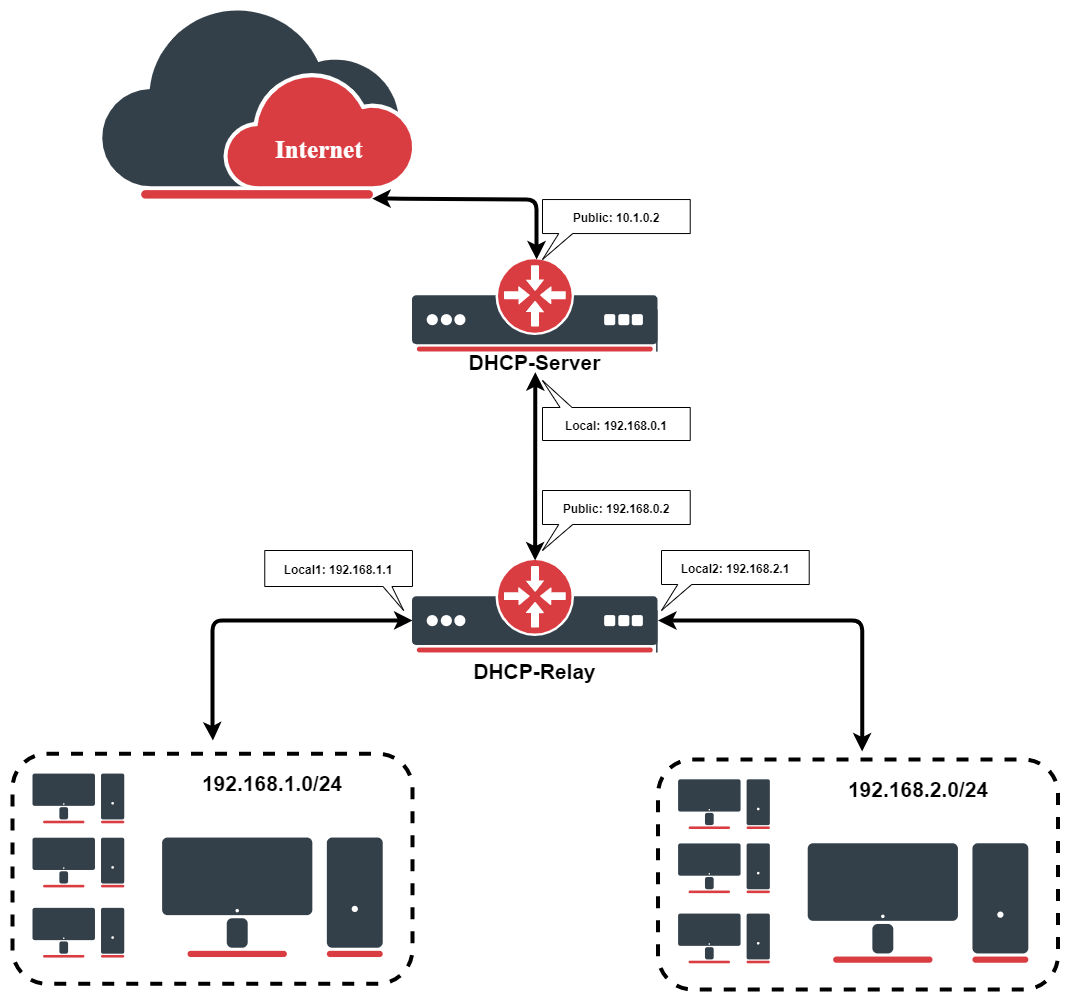
IP Address Configuration
IP addresses of DHCP-Server:
[admin@DHCP-Server] /ip/address> print
Flags: X - disabled, I - invalid, D - dynamic
 #   ADDRESS            NETWORK         BROADCAST       INTERFACE
 0   192.168.0.1/24     192.168.0.0     192.168.0.255   To-DHCP-Relay
 1   10.1.0.2/24	10.1.0.0	10.1.0.255	Public
[admin@DHCP-Server] /ip/address>
IP addresses of DHCP-Relay:
[admin@DHCP-Relay] /ip/address> print
Flags: X - disabled, I - invalid, D - dynamic
 #   ADDRESS            NETWORK         BROADCAST       INTERFACE
 0   192.168.0.2/24     192.168.0.0     192.168.0.255   To-DHCP-Server
 1   192.168.1.1/24     192.168.1.0     192.168.1.255   Local1
 2   192.168.2.1/24     192.168.2.0     192.168.2.255   Local2
[admin@DHCP-Relay] /ip/address>
DHCP Server Setup
To set up 2 DHCP Servers on the DHCP-Server router add 2 pools. For networks 192.168.1.0/24 and 192.168.2.0:
/ip/pool/add name=Local1-Pool ranges=192.168.1.11-192.168.1.100
/ip/pool/add name=Local2-Pool ranges=192.168.2.11-192.168.2.100
[admin@DHCP-Server] /ip/pool> print
 # NAME                                         RANGES
 0 Local1-Pool                                  192.168.1.11-192.168.1.100
 1 Local2-Pool                                  192.168.2.11-192.168.2.100
[admin@DHCP-Server] /ip/pool>
Create DHCP Servers:
/ip/dhcp-server/add interface=To-DHCP-Relay relay=192.168.1.1 \
   address-pool=Local1-Pool name=DHCP-1 disabled=no
/ip/dhcp-server/add interface=To-DHCP-Relay relay=192.168.2.1 \
   address-pool=Local2-Pool name=DHCP-2 disabled=no
[admin@DHCP-Server] /ip/dhcp-server> print
Flags: X - disabled, I - invalid
 #   NAME         INTERFACE     RELAY           ADDRESS-POOL LEASE-TIME ADD-ARP
 0   DHCP-1       To-DHCP-Relay 192.168.1.1     Local1-Pool  3d00:00:00
 1   DHCP-2       To-DHCP-Relay 192.168.2.1     Local2-Pool  3d00:00:00
[admin@DHCP-Server] /ip/dhcp-server>
Configure respective networks:
/ip/dhcp-server/network/add address=192.168.1.0/24 gateway=192.168.1.1 \
dns-server=159.148.60.20
/ip/dhcp-server/network/add address=192.168.2.0/24 gateway=192.168.2.1 \
-server 159.148.60.20
[admin@DHCP-Server] /ip/dhcp-server/network> print
# ADDRESS GATEWAY DNS-SERVER WINS-SERVER DOMAIN
0 192.168.1.0/24 192.168.1.1 159.148.60.20
1 192.168.2.0/24 192.168.2.1 159.148.60.20
[admin@DHCP-Server] /ip/dhcp-server/network>
DHCP Relay Config
Configuration of DHCP-Server is done. Now let's configure DHCP-Relay:
/ip/dhcp-relay/add name=Local1-Relay interface=Local1 \
   dhcp-server=192.168.0.1 local-address=192.168.1.1 disabled=no
/ip/dhcp-relay/add name=Local2-Relay interface=Local2 \
   dhcp-server=192.168.0.1 local-address=192.168.2.1 disabled=no
[admin@DHCP-Relay] /ip/dhcp-relay> print
Flags: X - disabled, I - invalid
 #   NAME                        INTERFACE      DHCP-SERVER     LOCAL-ADDRESS
 0   Local1-Relay                Local1         192.168.0.1     192.168.1.1
 1   Local2-Relay                Local2         192.168.0.1     192.168.2.1
[admin@DHCP-Relay] /ip/dhcp-relay>
DHCP Relay with VRF (introduced in 7.15)
Let's take the previous setup but we'll consider that the interface to the DHCP server and interfaces to DHCP clients are added in a VRF:
/ip/vrf
add interfaces=To-DHCP-Server name=vrf_server
add interfaces=Local2 name=vrf2
add interfaces=Local1 name=vrf1
In the DHCP-relay configuration dhcp-server-vrf should be added:
/ip/dhcp-relay/set dhcp-server-vrf=vrf_server numbers=0,1
Due to VRF configuration there are several routing-tables - we should add additional routes:
/ip/route
add disabled=no distance=1 dst-address=192.168.0.0/24 gateway=To-DHCP-Server@vrf_server pref-src="" routing-table=vrf1 scope=10 suppress-hw-offload=no \
    target-scope=10
add disabled=no distance=1 dst-address=192.168.0.0/24 gateway=To-DHCP-Server@vrf_server pref-src="" routing-table=vrf2 scope=10 suppress-hw-offload=no \
    target-scope=10
add disabled=no dst-address=192.168.1.0/24 gateway=Local1@vrf1 routing-table=vrf_server suppress-hw-offload=no
add disabled=no distance=1 dst-address=192.168.2.0/24 gateway=Local2@vrf2 pref-src="" routing-table=vrf_server scope=30 suppress-hw-offload=no \
    target-scope=10
To achieve successful DHCP-server - DHCP-relay communication we should add NAT rules:
/ip/firewall/nat
add action=dst- chain=dstnat dst-address=192.168.2.1 dst-port=67 in-interface=To-DHCP-Server protocol=udp src-address=192.168.0.1 to-addresses=\
192.168.0.2
add action=dst- chain=dstnat dst-address=192.168.1.1 dst-port=67 in-interface=To-DHCP-Server protocol=udp src-address=192.168.0.1 to-addresses=\
192.168.0.2
DHCPv6 Relay
Summary
Sub-menu: /ipv6/dhcp-relay
DHCPv6 Relay in RouterOS acts as an intermediary that forwards DHCPv6 client solicitations received on a local interface to a remote DHCPv6 server. The relay adds a Hop‑By‑Hop option containing its own link‑local address, enabling the server to know the client’s network location. Responses from the server are returned to the relay, which removes the Hop‑By‑Hop option and delivers the reply to the originating client. This allows a single DHCPv6 server to service multiple subnets without being directly connected to each, while preserving proper address assignment and prefix delegation. The relay requires IPv6 forwarding to be enabled and appropriate firewall allowances for UDP ports 546 (client) and 547 (server).
Properties
| Property | Description |
|---|---|
| comment (string; Default: ) | Descriptive name of an item. |
| delay-threshold (time | none; Default: none) | If the secs field in the DHCP packet is smaller than delay-threshold, then this packet is ignored. |
| dhcp-server (IPv6 address [IPv6]%interface; Default: ) | A list of DHCP server IP addresses to which DHCP requests should be forwarded (optionally, the interface can also be specified together with the IPv6 address). |
| interface (interface; Default: ) | Interface name the DHCP relay will be working on. |
| name (string; Default: ) | Descriptive name for the relay |
| dhcp-options(DHCPv6 option; Default: client_mac) | A list of DHCPv6 options to be inserted by the relay into forwarded DHCPv6 packets. By default, relay inserts option 79. |
| disabled (yes | no; Default: no) | Whether the relay is disabled or not. By default, it is not disabled. |
| link-address(IPv6 address [IPv6]; Default: :: ) | An IPv6 address that may be used by the server to identify the link on which the client is located. |
| store-relayed-bindings(yes | no; Default: no) | Inspects relayed DHCP advertisements and stores assigned prefixes. Should be used, for example, to avoid loss of routing information on relay reboot. By default, it is disabled. |